Step AI Agent
Overview
The Step AI Agent is an autonomous AI agent that turns high-level requirements or test specifications into validated and executable Step Automation Packages: standardized, reusable and scalable automation artefacts that can be used and reused across:
- Functional Testing
- Load & Performance Testing
- Synthetic Monitoring
- Robotic Process Automation (RPA)
Give it the systems under test (SUTs) in scope, your requirements, and any existing test cases or code. From there it runs transparently and unattended: the agent analyses what already exists, plans and implements the required automation, executes and validates it, and uses execution feedback to repair (self-healing) and stabilise the result before handover.
Within that workflow, the agent investigates where needed and acts deterministically wherever possible. The workflow is engineered for reproducibility, reliability and efficient evolution of growing test suites, and it contains the guardrails to maintain those objectives.
The Step AI Agent helps testers and developers:
- Reduce effort by automating significant parts of planning, implementation, execution and maintenance
- Improve quality through validated, maintainable automation artefacts and controlled feedback loops
Testers can operate the Step AI Agent from a UI such as Step Studio, while developers can work from their preferred full-code environments, including IDEs such as VS Code or IntelliJ, complemented by CI/CD pipelines such as GitLab or Jenkins, as detailed under Integration with CI/CD pipelines.
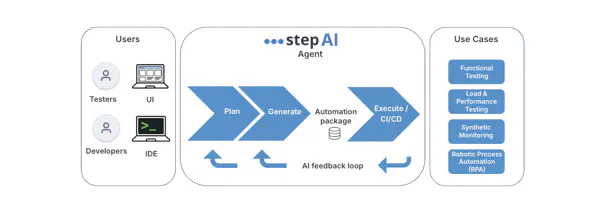
The Step AI Agent is part of the broader Step AI ecosystem, alongside the Step MCP Server and Step Skills.
Why do you need this?
AI assistants can already generate test code, interact with applications and help diagnose failures. With MCP servers and reusable Skills, developers can assemble sophisticated AI testing workflows themselves.
The challenge is making those workflows reliable and repeatable as automation grows. The overall process needs to decide what already exists, what needs to be created or changed, how automation should be validated, when a failure should trigger a repair, and when the result is stable enough to hand over.
The Step AI Agent makes this workflow part of the product. It orchestrates planning, technical scaffolding, implementation, execution, validation and repair through a controlled process, using deterministic logic wherever possible and AI where investigation and reasoning are required.
The result is ordinary Step automation: a deployable automation package that can be versioned, inspected, shared across teams and executed on the same Step infrastructure as other automation. Once generated, its execution does not depend on the AI Agent.
Who needs this?
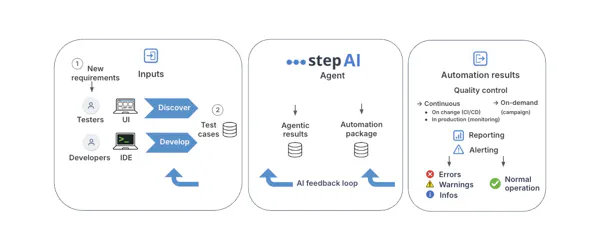
The Step AI Agent supports both testers and developers, starting from the same trigger: ① a new requirement, such as a new application or feature implementing a functional capability defined by the business. It can be passed to the agent as such.
🧪 Testers and QA engineers
Testers turn ① the business requirement into ② test cases, the specification the agent works from, either through their own discovery of the system under test or by letting the Step AI Agent discover it holistically and propose them. Where test cases already exist, they can also be supplied to the agent, which can consolidate them, identify coverage gaps and focus its discovery on what is missing or has changed. This user-centric approach, which requires no access to the source code, is known as black-box testing.
This path is particularly suited to systems whose source is not available: a vendor product, a third-party service or any otherwise closed application, which is frequent in enterprise environments. Discovery through the running system is then the only route available, and the one the agent takes. It is also a deliberate choice when the source code is available: deriving test cases from requirements rather than implementation keeps them aligned with business intent and actual usage, avoids inheriting assumptions embedded in the code, and helps catch implementations that are technically correct but fail to meet business expectations.
The resulting automation package and execution results help testers confirm the business intent and ensure stable, low-risk operation through recurring automated testing and monitoring. Issues can be raised with the business or application owner, or lead to revisiting the test cases.
A range of tooling can be connected to this workflow, from where test cases are managed to where results are reported: see Horizontal integrations.
Delegating the implementation to the agent frees testers from scripting and maintaining the automation themselves, while the test cases remain theirs: readable, reviewable and the reference against which the generated automation is validated.
⚙️ Developers and DevOps
Developers turn ① the business requirement into application code and ② test cases, with or without AI assistance. This code-centric approach enables white-box testing, where tests are informed by the application’s internal structure.
The Step AI Agent builds and maintains the automation that validates the application. It creates or reuses existing test assets, identifies coverage gaps, and extends what already exists rather than duplicating it. Instead of another isolated test suite, the result is standard Step automation: orchestrated and executed at scale, and reusable by other teams and across disciplines such as load testing and synthetic monitoring.
The resulting automation package and execution results help developers confirm that the application meets the business intent, identify bugs and improve the application code. Run regularly as regression coverage as part of the CI/CD pipeline, the automation verifies that this remains true as the application evolves, while execution feedback helps maintain and improve the quality of the tests themselves.
See Horizontal integrations below for the developer toolchain, from source control to CI/CD.
With the agent taking care of test automation, developers can focus on the application itself, while the generated package remains ordinary code: inspectable, versionable and executable in their own CI/CD pipeline without the agent. Individual steps of the agentic workflow, such as validating a plan or analysing results, can also be invoked independently, for example through the Step MCP Server.
What you get
An agent run produces results of its own: what it decided, what it delivered, and at what cost. What it hands over is an automation package, and running that package produces results of a different kind, the ones that keep arriving once the agent is gone.
Agentic results
An agent run closes with a report on its own work: an overall verdict, one line per requested test case recording how it was verified and whether the plan covered it, and what the run consumed in duration and cost, broken down phase by phase and including how many repair rounds were needed.
The material behind that verdict is kept too. As it works, the agent records the assumptions it had to make, the discrepancies between your request and the application as it actually behaves, the decisions taken at each phase and the reasoning behind them, and the evidence its diagnoses were drawn from: a log for each phase, the browser traces from its exploration of the application, and one execution trace per keyword from the run that validated it.
Together with the origin stamped on every generated plan, this is the audit trail for AI-generated automation: what was produced, from which request, and on what basis.
Automation package
The Step AI Agent produces a standardized Automation Package containing the generated automation and its reusable building blocks. It can be inspected and versioned like regular code, then run locally through the Step CLI, or deployed and executed centrally on a Step instance, as part of your CI/CD pipelines or as on-demand campaigns.
Those building blocks accumulate what the agent has worked out about the system under test: the user flows that work end to end, the selector that holds, the wait a slow screen needs, the way a particular widget has to be driven. Later agent runs extend them rather than rediscovering them, which is what makes added coverage both cheaper and more reliable.
The same automation can be reused across functional testing, load and performance testing, synthetic monitoring and RPA. Both tester and developer audiences work with these same artefacts, while interacting with them from their respective testing and development workflows.
Automation results
Running the package produces structured information across runs, together with synthesized results and recommendations. Findings are surfaced as passed, failed, warning or informational outcomes.
These results are what the automation exists to produce: quality control through reporting and alerting. They keep arriving long after the agent has finished, and the same package serves three modes:
- Continuous quality monitoring on change. Regression testing as part of your CI/CD pipelines, confirming that each change leaves the verified behaviour intact.
- Continuous quality monitoring in production. Synthetic monitoring against the live system, checking availability and performance on a recurring schedule.
- On-demand quality control. Runs triggered when you need the answer, such as validating a release candidate or reproducing a reported problem.
This feedback serves the whole loop: validating the automation and the implementation against the business intent, surfacing bugs and regressions, assessing stable operation, and pointing at what to improve next, whether that is the test case, the automation, the application code, or the environment and infrastructure the run depends on.
How it works
Agentic workflow
The Step AI Agent combines AI reasoning with a controlled, multi-phase workflow. AI is used where interpretation, investigation or adaptation is required, while deterministic logic handles decisions and operations that can be specified reliably.
A run moves through clearly separated phases:
- Understand the request. The agent reads the requested test cases and resolves them against what the automation package contains if one is supplied, filing the request under the use case in scope.
- Plan. It produces real Step test plans, one per requested test case, broken into the journey’s steps and described in plain language before anything is built. Values trace back to your specification and gaps are called out, not quietly filled.
- Review the plan. A separate phase, not the one that wrote the plan, checks it against your request: what is covered, what is missing, and anything the plan added that you never asked for. Each case gets a verdict and the reasoning behind it. The plan is also validated against the automation package schema, so a plan that would not load is caught here rather than at execution. Step validates the plan itself, not the agent, and a plan missing a test case you asked for stops the run.
- Design. The agent explores the live application to work out how each step must be driven, running the journey end to end against the real system and confirming the automation will target the right thing reliably. Differences between your request and the application as it actually behaves, and any assumption it had to make, are written down rather than absorbed silently. The design is reviewable before a line of code exists.
- Implement. The automation is written from that design as Step keywords, each with declared inputs and outputs, reusable beyond the test case that prompted it, and validated before it goes any further. Every generated plan carries its origin and the run that produced it, so AI-generated automation stays identifiable later.
- Execute and repair. The automation runs as an ordinary Step execution, producing the same report as any other. It runs locally first, a cheap check that the generated automation really works, and then, if you enable it, centrally on a Step instance, where a fresh environment of your choosing, parallel execution and real infrastructure expose timing-dependent flakiness and environment problems. Failures from either run are diagnosed from the evidence left behind and repaired (self-healing), the diagnosis distinguishing automation that needs fixing from a test case that does not hold and from an application that is genuinely failing.
- Report. A report is produced whether the run succeeded or failed, recording the verdict, what each test case was verified by, how well the plan covered the request, and what the run consumed. When a run fails, it also explains the cause in plain language and suggests next steps. The finished package is published at this point, ready for downstream usage.
Each phase produces its own outputs, from the plan and specifications to the automation package, logs, traces and final report. A run can therefore be inspected step by step, rather than judged on its end result alone. Specific guardrails keep each phase aligned with what the one before it established, so a run cannot quietly drift away from what was asked.
Guidance can also be provided for the whole run, a specific test case or a particular phase, for example a screen that is slow to settle, a selector convention to follow or a case that must be covered. These hints inform the relevant phase without overriding the rules enforced by the workflow.
Vertical integrations
Vertical integrations cover both the technology used to access, drive and observe a system under test (SUT), and the technology of the SUT itself.
The Step AI Agent manages the underlying automation technology as part of its workflow, including its setup, execution and technology-specific behavior. The appropriate technology depends on the target system: browser applications can be automated through Playwright, while Java desktop applications can be driven through Oryon.
This allows the same agentic workflow to operate across different types of systems while abstracting the underlying automation technology from the user.

Horizontal integrations
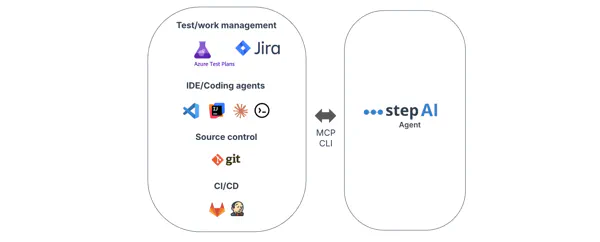
Horizontal integrations are how the agent fits into the toolchain you already use across the testing lifecycle: where requirements and test cases are managed, where code is written and versioned, where automation is triggered, and where results and defects are reported.
The Step AI Agent fits into this toolchain through interfaces such as the Step MCP Server and the Step CLI, spanning test and work management, IDEs and coding agents, source control, and CI/CD, and leveraging the existing integrations of Step. This allows the Step AI Agent to be integrated directly into testers’ and developers’ existing workflows.
Validated in practice
We benchmark the Step AI Agent through controlled, repeated end-to-end runs to evaluate both the quality of the automation it produces and the efficiency of the workflow.
Reproducibility
Our first study evaluates whether repeated independent runs of the same scenario produce reliable automation, looking at success rate, execution stability, test-to-specification fidelity and package compliance, alongside workflow duration and cost.
📊 Read “Agentic Testing - Part 1: Reproducibility”
Scaling test suites
Our second study evaluates how the workflow behaves as test suites grow, comparing incremental extension and reuse of existing automation with repeatedly processing the complete automation codebase. It measures how reuse affects the cost and efficiency of extending coverage over time.
📊 Read “Agentic Testing - Part 2: Scaling Test Suites”
For the broader positioning of the Step AI Agent relative to Step MCP and Step Skills, see the Step AI ecosystem.
Getting started
See Getting started with the Step AI Agent for prerequisites, setup and a first run, and Tutorials for two worked end-to-end examples, one from the Tester’s side and one from the Developer’s. Or reach out at contact@exense.ch to discuss your use case and see a demo.